Lost your manual for the Sentro 48-needle Upgraded machine, or bought one second-hand? This guide starts with what makes the Upgraded version different — its desktop-fixing installation — then walks through tube and panel knitting in plain order, and gives you the original PDF download. Read the source note below before treating this as a single complete manual, because the Upgraded file itself is only an installation sheet.
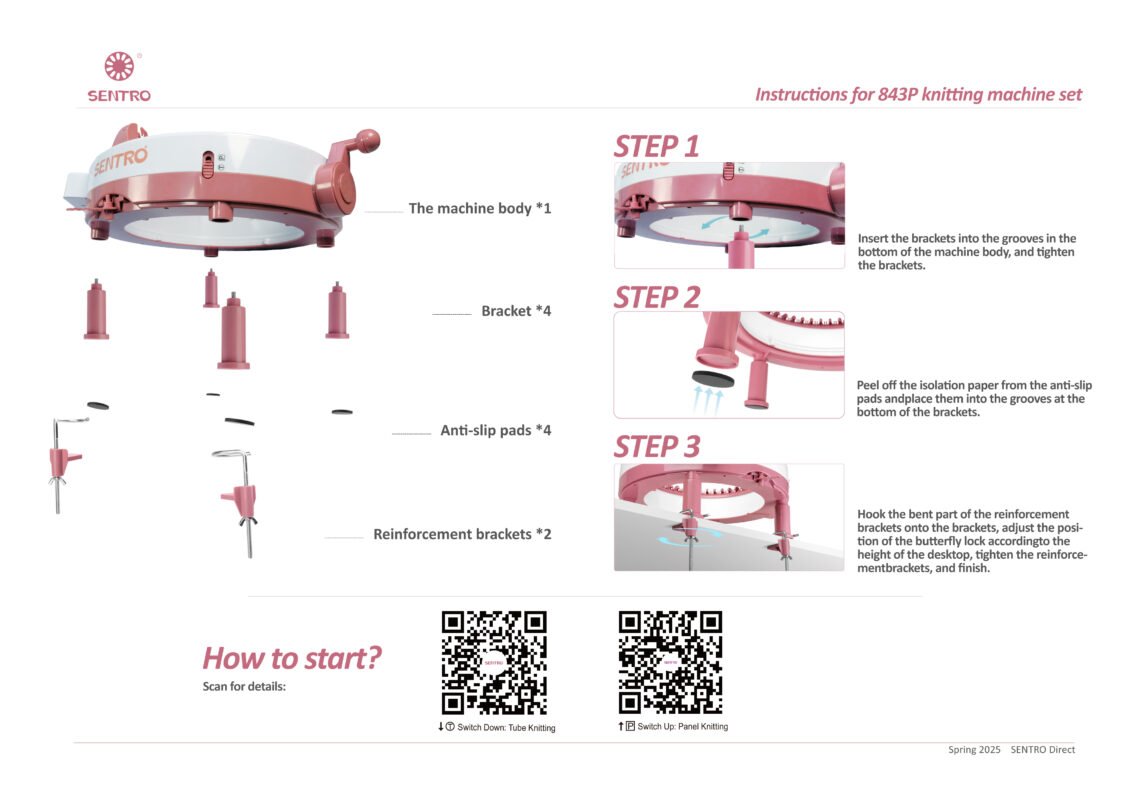
Download the original Sentro 48-needle Upgraded installation sheet (PDF, 843P)
Source note, stated plainly: the 843P file is a 1-page installation sheet, not a full manual. It covers brackets, anti-slip pads and reinforcement-bracket desktop fixing, and it labels Switch Down = Tube and Switch Up = Panel, but it contains no threading steps, no tube/panel method steps, no yarn/tension numbers, no cast-off, no dropped-stitch recovery, and no row-counter mention. The tube/panel method sections below therefore follow the verified 843 instruction sheet for the same 48-needle model (the Blue 843 sheet, visually checked 2026-10-26), and each method section is labelled as such. Do not present the 843P sheet as a full manual, and do not remove this source note before a full Upgraded manual is supplied or verified.
Note on the model number: the 843P file’s printed title is “Instructions for 843P knitting machine set”, so 843P is printed inside this file, unlike 843 in the Blue sheet. The file’s text does not print the words “Upgraded”, “pink” or “48”; the pink appearance is from the sheet’s photographs, and the Upgraded identification comes from Jones’s model mapping and the product listing, not from the sheet’s text alone.
At a glance: the 48-needle Upgraded machine
| Item | What to know | Source |
|---|---|---|
| Needles | 48 hooks; flat panel uses 44 | Verified 843 sheet Figure 1; product archive for flat-panel count |
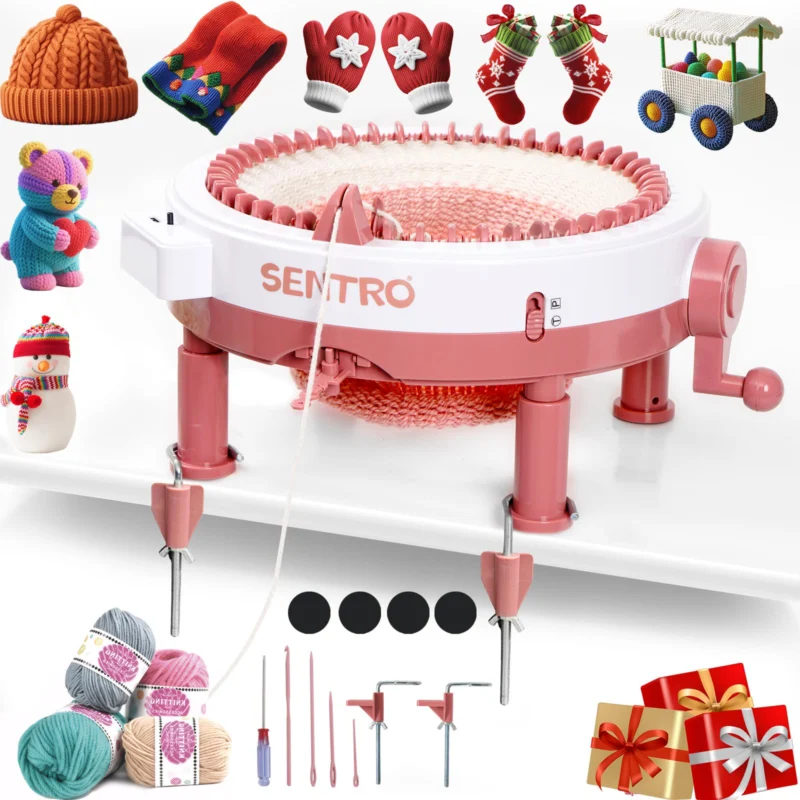
| Distinguishing feature | Reinforcement brackets for desktop fixing, in place of suction-cup-only fixing on the standard 48 | 843P installation sheet (functionally a table clamp; the sheet does not use the words table clamp) |
| Colour shown in the 843P sheet | Pink/white machine in the photographs | 843P sheet photographs, not its text |
| Tube size | About 24 cm across | Product archive (not stated in either sheet) |
| Panel width | About 32 cm | Product archive (not stated in either sheet) |
| Yarn range | 1.5–4.5 mm in the product archive; neither sheet gives a numeric yarn weight | Product archive for the range; sheets for qualitative guidance |
| Tension | Four settings in the verified 843 sheet Figure 4: 1 tight, 2 moderate, 3 loose, 4 tightest (for thinner yarn) | Verified 843 sheet, not the 843P sheet |
| Row counter | Shown as a part label in the verified 843 sheet, with zeroing before tube knitting; the 843P sheet does not mention a counter at all | Verified 843 sheet only; this article does not present the counter as a selling point |
| Modes | Tube knitting and panel knitting, selected with a switch | Both sheets agree on the switch labels |
| Switch direction | Down for tube, up for panel | 843P QR labels and verified 843 sheet, consistent |
Do not copy the switch direction from another model. Each model’s direction must be checked on its own sheet.
How to tell this is your machine
Look for a 48-hook machine with reinforcement brackets that hook over a table edge and tighten with butterfly locks, rather than only pillars and suction cups. If your machine has only pillars and suction cups, it is the standard Pink or Blue version, not the Upgraded version; see those guides linked below.
Setup — desktop fixing (from the 843P installation sheet)
- Insert the brackets into the slots in the bottom of the machine body and tighten them.
- Peel the backing paper from the anti-slip pads and place the pads into the slots in the bottom of the brackets.
- Hook the curved part of the reinforcement brackets onto the brackets, adjust the butterfly lock position to your table height, and tighten the reinforcement brackets. The machine should now be fixed to the table and should not rock or slide while you crank.
- Put the machine on a flat, stable table and hold the top steady with one hand while cranking with the other, as in the general 48-needle method below.
Choosing yarn and tension (from the verified 843 sheet)
The sheets do not give a yarn weight number, so use the qualitative rules first and test a swatch before starting a project:
- Most ordinary yarns can be used, including the yarn supplied in the box, but do not use bulky yarn. Eyelash/fur yarn is not ideal but may work.
- Start with a medium (worsted) yarn in two tension slots; try all three slots for finer yarn.
- If the tension is too tight, release the yarn from the tension slots one at a time until it runs smoothly.
- Wind yarn into a ball so it unwinds freely. If you work straight from a hank, pull out 2–3 metres of slack at a time and keep the yarn loose as it feeds in.
- While knitting, keep a loose pile of yarn feeding in, gently pull the finished fabric down from below from time to time, and untwist it as it grows so it does not bunch up and skip stitches.
For a fuller yarn guide, including fibres that tend to jam, see Best Yarn for a Sentro Knitting Machine.
Threading and the first rows (from the verified 843 sheet)
The threading section in the verified 843 sheet is brief: it points to a start video through QR codes, rather than giving a hook-by-hook written cast-on. This article therefore does not invent a detailed cast-on that is not in the sheet, and it does not claim this section comes from the 843P sheet.
- Set the tension: thread the yarn through the yarn guide opening, pulling it down into the groove at the bottom, lift the tension lever, and thread the yarn through until it comes out at the bottom.
- Pass the yarn under the hooks, cranking slowly and without skipping any hook. The first 3–4 rows are the foundation rows: go especially slowly and do not skip a hook.
- Keep the yarn loose as you crank. Speed and force are the fastest way to damage the machine and drop stitches.
- Before tube knitting, zero the row counter, as the verified 843 sheet instructs. The 843P sheet gives no counter operation, and neither sheet gives a detailed counter operation beyond that label and zeroing step.
For a step-by-step beginner walkthrough, see Learn to Use Your SENTRO Knitting Machine: A Beginner’s Guide. That guide is based on the 48-needle machine, so its method applies directly here.
Tube knitting (from the verified 843 sheet)
- Slide the switch down (T) for tube knitting.
- Knit in one direction, turning the crank clockwise at a steady, slow pace for the first rows.
- A tube closed at one end makes hats, bags and similar items; an open tube makes scarves, leg warmers and similar items.
- To finish a tube, stop when it reaches the length you want, with a white hook beside the yarn guide, and follow the removal steps in the next section.
Panel (flat) knitting (from the verified 843 sheet)
- Slide the switch up (P) for panel knitting.
- Turn the crank in one direction until it reaches its limit, then reverse direction and crank back. Alternate directions at each end.
- At each turn, crank fully to the stop until the machine comes to a complete halt. Short turns at the ends are a common cause of dropped stitches at the edges.
- The verified 843 sheet gives no separate panel bind-off step; its bind-off section is headed for a tube. Do not present the tube bind-off below as a panel-specific step from either sheet.
Changing yarn and removing your work (from the verified 843 sheet)
- To change colour or join a new ball, knot the new yarn to the old yarn with a square knot that will not slip, trim close to the knot, and take the yarn off the tension lever so the knot can pass through. Pull the yarn through the tensioner until the knot is past, re-thread it, and start cranking slowly again.
- To remove a tube, stop at the length you want and cut a tail of about 45–60 cm. Take that tail out of the tensioner and yarn guide, thread it onto a plastic sewing needle, and, with no yarn feeding in, work it through the stitches one by one, alternating front and back, until every stitch has yarn through it. Then crank clockwise so all stitches come off the hooks.
- For an open tube, such as a scarf, backstitch the last few stitches with the sewing needle, knot and trim. For a closed tube, such as a hat, pull the loose end tight to gather the opening, knot and sew it closed. Picking up the last row with a circular needle gives a neater, more elastic edge if you prefer that finish.
If a stitch drops (from the verified 843 sheet)
Neither sheet has a troubleshooting table, so the points below are the verified 843 sheet’s dropped-stitch steps, collected here in one place. For a fuller guide, see Why Is My Sentro Dropping Stitches?.
- Test a swatch first to find the best tension for your yarn, rather than guessing on a full project.
- If the tension is too tight, release the yarn from the tension slots one at a time.
- If yarn catches on a hook, push the caught stitch from the bottom of the hook toward the back of the needle.
- If stitches keep skipping, check that the yarn is loose, pull the fabric down gently from below, and untwist it as it grows.
- To pick up a dropped stitch, crank to the last stitch before the drop, with that hook raised beside the yarn guide, find the dropped loop and the ladder bars above it, and use a crochet hook to work the loop up bar by bar from front to back until it is back on the machine hook.
Care and storage
Keep the machine clean and dry, and do not force the crank if it stiffens. For cleaning and lubrication in detail, see How to Clean and Lubricate Your Sentro Knitting Machine.
More manuals and related guides
- SENTRO Knitting Machine User Manual — all models
- Sentro 48-Needle Upgraded Knitting Machine (product page)
- Best Yarn for a Sentro Knitting Machine
- Why Is My Sentro Dropping Stitches?
- How to Clean and Lubricate Your Sentro Knitting Machine
Direct links to the 48 Pink, 48 Blue, 32-needle and 40-needle manual articles are to be added after their real URLs exist. Do not guess their slugs in advance.
Download the original Sentro 48-needle Upgraded installation sheet (PDF, 843P)
FAQ
Where can I download the Sentro 48-needle Upgraded manual?
Use the download button above, which links to the 843P installation sheet already in the site media library, or go to the User Manual hub page and choose the 843P card. Note that this file is an installation sheet, not a full manual, as explained in the source note at the top of this article.
What makes the Upgraded version different?
Its desktop fixing: reinforcement brackets that hook and tighten to a table, instead of suction-cup-only fixing on the standard 48. That distinction comes from the 843P installation sheet itself.
Does the Upgraded machine have a row counter?
The verified 843 sheet labels a row counter and says to zero it before tube knitting, but it gives no detailed counter operation, and the 843P sheet does not mention a counter at all. Count rows by hand as a check if you need an exact count. This article does not present the counter as a selling point.
What yarn works on the 48-needle Upgraded machine?
Neither sheet gives a numeric yarn weight. In practice, use a medium yarn first, test a swatch, avoid bulky yarn, and use two tension slots for worsted yarn or all three for finer yarn, as described above. The product archive range is 1.5–4.5 mm.
Why does my panel drop stitches at the ends?
On panel knitting, crank fully to the stop at each turn until the machine halts completely. Short, incomplete turns at the ends are the verified sheet’s own explanation for edge drops.